
What can I use this for?
Membership.io tracks content usage using upload hours, which measure the total duration of media you’ve uploaded and processed in your Library.
Every audio and video file you upload is automatically transcribed and processed (including AI indexing). These processing hours are what count toward your plan usage.
IMPORTANT: Deleting videos or older recordings does not restore upload hours. Because upload hours are tied to transcription and processing—not active storage—once a file has been processed, its hours remain counted toward your plan even if the content is later removed.
How to track upload usage
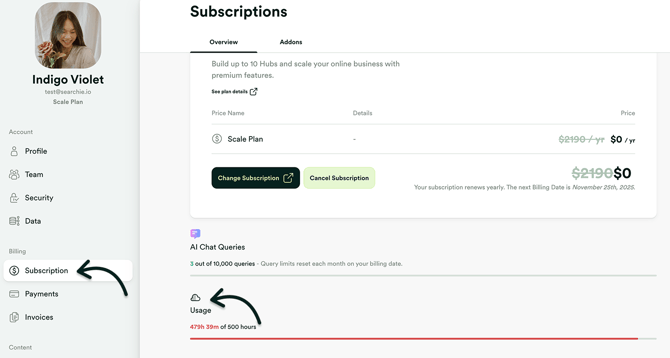
Head to the bottom of the Subscriptions page in your account to track how many hours of content you have uploaded.
Need more upload hours?
If you’re approaching your limit, you have a few options:
-
Increase your available upload hours from your Subscription settings
-
Replace an existing media file instead of adding a new one
-
Reduce the file size of your media files before uploading
- If possible, shorten the duration of your uploads before uploading
If you have questions, please feel free to reach out to us at help@membership.io!