
When you create a Hub, Membership.io automatically assigns a default URL that looks like:
https://hub-o8xr9d4o0q.membership.io
The hub-o8xr9d4o0q part is called the URL slug. This slug uniquely identifies your Hub on Membership.io.
You can change it anytime if you want a cleaner, more recognizable URL.
NOTE: If you want to change the URL slug for your Hub pages (not the main Hub URL), please refer to Change your Hub page slugs.
What can I use this for?
Changing your Hub URL slug is particularly useful if you want a more branded or readable Hub link or rebrand your business or product.
You can use this feature as an alternative to connecting a fully custom domain, and it can also be used alongside one.
Step 1 – Open Domain settings
From the Hub preview page, go to Settings > Domain. Under Default URL, click ✏️ Edit Slug.
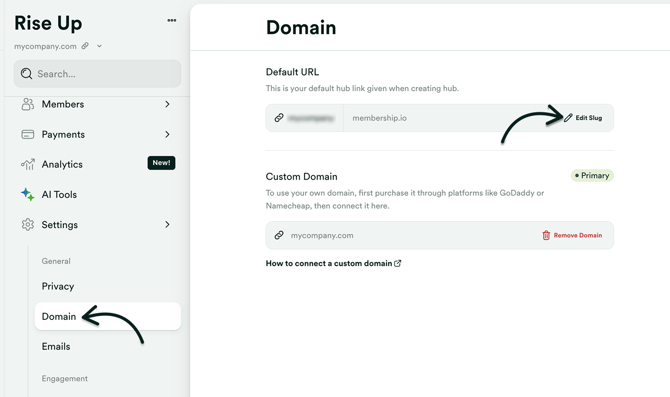
Step 2 – Enter a new slug
Type your new Hub slug and review the validation rules before saving.
Your slug must:
- Be at least 3 and not exceed ~60 characters
- Use only letters, numbers, and hyphens
- Not start or end with a hyphen
- Not contain consecutive hyphens
- Not use reserved or restricted terms
Certain system, application, and brand-related terms are blocked to prevent conflicts or misuse (for example, admin, login, checkout, or membership).
Example:
- Good: creator-academy
- Bad: -creator--academy!
Step 3 – Save your changes
Once you're satisfied, click Save Slug. Your default Hub URL will immediately update to:
https://your-new-slug.membership.io
What happens to existing links?
This depends on whether you are using a custom domain.
If you are NOT using a custom domain or subdomain
Previously shared links using the old slug will stop working immediately. Members will not be redirected to the new slug. Because of this, we recommend updating your slug before sharing your Hub link.
If your Hub is connected to a custom domain or subdomain
Example:
-
my-hub.mycompany.com
-
mycompany.com
Visitors who access the old default Hub URL (e.g., hub-3sdfdf3.membership.io) will be redirected to your custom domain or subdomain.
Best practices
- Choose your slug early to avoid breaking shared links.
- Avoid generic or system-like terms that may be restricted.
- If link continuity matters, consider setting up a custom domain.