
🧰 What You Will Need:
A Membership Hub (Start planor higher)
⚠️ IMPORTANT: Only recurring Stripe Payment Links—monthly or annual—automatically create Hub member accounts and grant access to the associated Hub.
If you create a Stripe Payment Link for a one-time price outside your Hub's built-in pricing, buyers will be charged, but they won't be automatically added to your Hub or receive a welcome email. For one-time purchases, use your Hub's built-in checkout instead.
What can I use this for?
When a member completes checkout by directly using a Stripe Payment Link for a recurring price, their Membership.io member account is automatically created using the email address entered during checkout.
.png?width=670&height=415&name=Checkout%20page%20email%20address%20field%20(2).png)
The member then receives a welcome email and is granted access to the Hub associated with that purchase.
Step 1 – Create a price in your Hub
Before creating a Stripe Payment Link, create the price in your Hub by going to Payments > Pricing.
Once created, allow a few moments for the price to sync to Stripe before continuing.
Step 2 – Create a Stripe Payment Link
In your Stripe dashboard, open Payment Links and click ➕ Create payment link in the top-right corner.
Select the product and recurring price created in Membership.io—not a new product or price created in Stripe. Otherwise, Membership.io won’t recognize the purchase, and the member won’t receive Hub access.
.png?width=670&height=398&name=Select%20the%20price%20to%20use%20for%20the%20payment%20link%20creation%20(2).png)
💡Free trial option
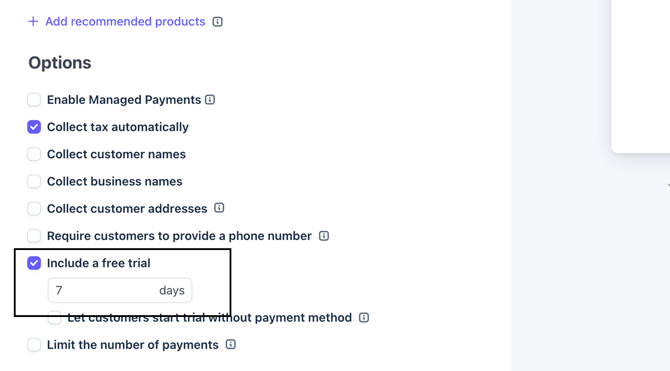
Under Options, you can put a check before "Include a free trial" and set the number of days. This activates the free trial for your product/price upon successful sign-up, and the member will only be charged after the free trial period expires.
Click Create link ✔️ to generate your Stripe payment link. This creates the checkout URL you’ll share with your members.
Step 3 – Share the payment link
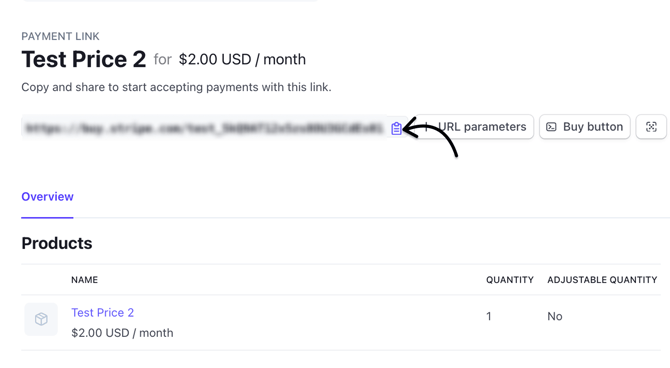
Once created, copy the Stripe payment link and share it with your members.
After checkout, the member will receive a welcome email with a link to complete the Hub registration.
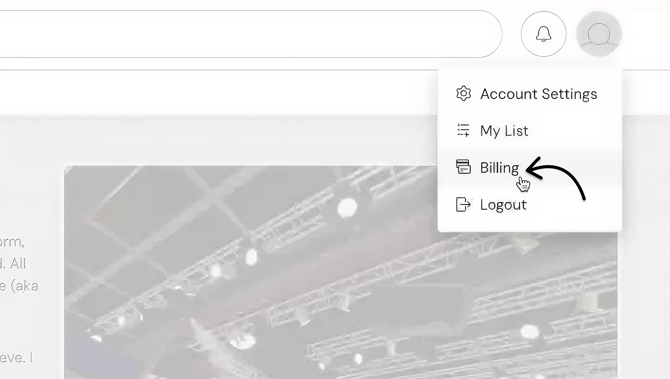
Members can check their billing status, such as confirming whether they’re in a free trial, anytime by opening their Hub profile and selecting Billing.
Want to offer a one-time payment?
If you'd like members to pay only once while still using a Stripe Payment Link, create a recurring price in your Hub and apply a coupon that waives future renewal payments. You can visit this Stripe documentation for further reading.
Because this is a recurring price in nature, the member is automatically added to your Hub while only being charged once.